Time Saving Marking Hacks for Australian Teachers
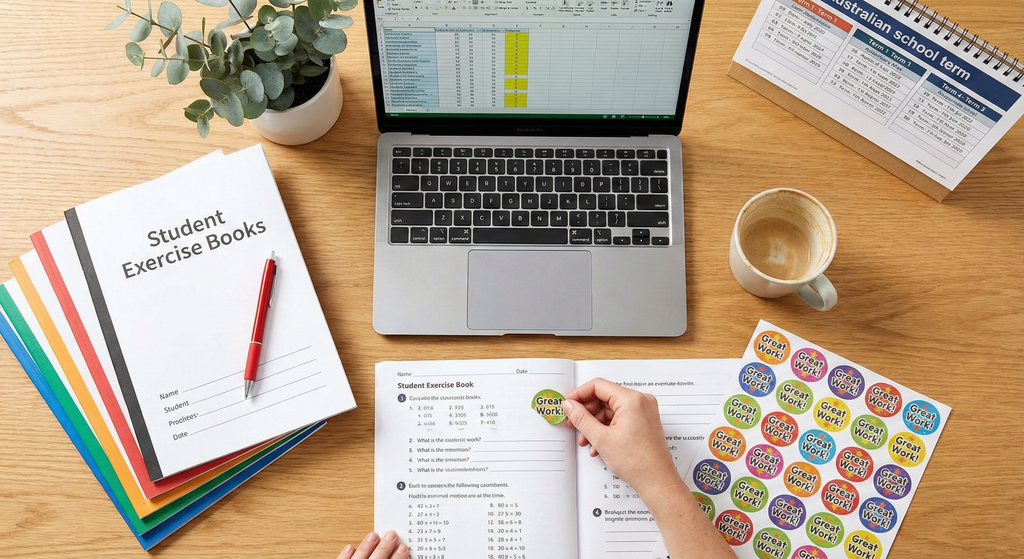
It is 4:00 PM on a Tuesday. The bell has gone, the bus duty is done, and you are staring at the "marking bag of doom"—that canvas tote filled with 28 narrative writing drafts that you swore you’d finish over the weekend but definitely didn’t.
If you are an Australian teacher, this scenario is all too familiar. We know that effective feedback is crucial for student growth (Hattie’s research tells us so), but there is a limit to how many hours exist in a day. The burnout rate in our profession is real, and often, it’s the administrative weight of assessment that tips the scales.
The good news? You don’t have to choose between your sanity and being a great teacher. You can reclaim your evenings.
Below, we dive into practical, classroom-tested systems to slash your marking time in half while actually improving the feedback your students receive.
At a Glance: The Marking Hack Matrix
Short on time right now? Here is a quick breakdown of the strategies we will cover, so you can jump to what you need.
| Hack | Best For | Setup Time | Estimated Time Saved |
| Live Marking | Writing, Maths, drafted work | None | 2–3 hours per week |
| Whole Class Feedback | Summative tasks, drafts | 5 mins | 1 hour per set |
| Code Marking | Spelling, Grammar, editing | 10 mins (to teach codes) | 50% reduction per book |
| Sticker Feedback | Quick formative checks | Low (just buy the pack!) | 30 secs per student |
| Verbal Feedback | In-the-moment correction | None | Immediate |
| Peer Assessment | Drafts, success criteria checks | 15 mins (modelling) | Entire marking load |
| Targeted Sampling | Daily workbooks | None | 60% reduction |
| Audio Feedback | Senior/Secondary essays | 5 mins (tech setup) | 5 mins per essay |
12 Time Saving Marking Hacks for Australian Classrooms
We have curated these hacks specifically for the Australian context, keeping in mind AITSL standards and the reality of a busy term.
1. Live Marking (The Holy Grail)
Stop taking books home. The most effective feedback is immediate. While students are working independently, circulate the room with a pen (or a stamp). Mark the work with the student.
-
How to do it: Move to a student, read their sentence/equation, point out the error or success, and have them fix it right then.
-
Why it works: Students act on the feedback immediately rather than ignoring comments written three days later.
2. The "Whole Class" Feedback Sheet
Instead of writing "Please use capital letters for proper nouns" in 25 different workbooks, write it once.
-
How to do it: As you read through a set of books, have a blank piece of paper next to you. Note down:
-
3 things the class did well.
-
3 common errors.
-
2 spelling words everyone got wrong.
-
-
The Next Lesson: Present this sheet to the class. Have them look at their own work and self-correct based on the common errors.
3. Utilise Visual Feedback Tools (Stickers)
Sometimes, a long written comment isn't necessary. A strategic sticker can denote that a specific learning goal has been met. This is where Sticksy Prints Australia comes in handy.
-
How to do it: Use specific stickers for specific outcomes. A "Goal Smashed" sticker creates a visual anchor for the student. It signifies, "I have seen this, it is correct, well done."
-
Recommendation: Check out our Teacher Reward Sticker Bundles to keep your desk stocked with quick-feedback tools.
4. Code Marking
Stop acting as a spell-checker. If you circle every error, the student becomes overwhelmed.
-
How to do it: Agree on a code with your class.
-
Sp = Spelling error (in the margin).
-
// = New paragraph needed.
-
? = This doesn't make sense.
-
-
The shift: Place the code in the margin. The student must find the error on that line and fix it. This shifts the cognitive load from you to them.
5. Targeted Sampling (The 1-in-3 Rule)
You do not need to mark every page of every book every day.
-
How to do it: Divide your class list into three groups (Group A, B, C). On Monday, you do a deep dive mark of Group A’s books. Groups B and C get a quick glance or a simple tick/sticker for completion. On Tuesday, deep dive Group B.
-
The Result: Every student gets detailed feedback once every three days, which is far more sustainable and effective than rushed feedback daily.
6. The "Dot" Method
When walking around the room, if you see a mistake, simply put a small dot in pencil next to it. Say nothing. Walk away.
-
The Task: The student knows a dot means "something is wrong here." They must figure it out. If they can't, they can ask a peer. They can only ask you if the "three before me" rule has been exhausted.
7. Peer Assessment with Structure
"Swap books and mark" usually ends in disaster without scaffolding.
-
How to do it: Use the "Two Stars and a Wish" method, but make it rigorous. The students must identify two places the success criteria were met (highlighted in yellow) and one specific area for improvement based on the rubric.
8. Audio Feedback (Mote or OneNote)
For secondary teachers or upper primary teachers dealing with long essays, typing comments is slow. Speaking is fast.
-
How to do it: Use tools like Mote (a Chrome extension) or the audio record function in OneNote. Record 60 seconds of feedback.
-
The Benefit: You can convey tone, nuance, and encouragement much better in voice than in red pen.
9. Self-Assessment Highlighting
Before a student hands in work, they must highlight where they have met the criteria.
-
How to do it: "Highlight your topic sentence in green. Highlight your evidence in pink."
-
The Time Save: If the page has no green or pink, you don't accept the work. It forces the student to check their work before it hits your desk.
10. Comment Banks
If you are typing reports or feedback on Google Docs, stop typing the same phrases.
-
How to do it: Create a "Cheat Sheet" document with your most common feedback phrases for that unit. Copy and paste, then tweak slightly for personalization. Text replacement shortcuts on your iPad or Mac can also be a lifesaver here.
11. The "Keep/Change" Strategy
For draft feedback, limit yourself to two instructions.
-
How to do it: "Keep this paragraph (it’s great). Change the opening sentence of the second paragraph."
-
Why: It stops you from rewriting their work for them.
12. Batch Your Marking
Context switching kills productivity.
-
How to do it: Don't mark one Maths book, answer an email, then mark an English draft. Set a timer for 25 minutes (Pomodoro technique) and do nothing but mark that specific set of papers.
The 15-Minute Marking Reset Routine
Feeling overwhelmed? Use this routine on a Friday afternoon before you leave school to ensure a guilt-free weekend.
-
Triage (5 Minutes): Sort the pile. What actually needs detailed marking? What just needs a "sighted" tick? What can be peer-assessed on Monday? Be ruthless.
-
The Sticker Blitz (5 Minutes): Take your pile of "sighted" work. Go through and apply Positive feedback stickers for classrooms. It shows presence without requiring paragraphs of text.
-
The Plan (5 Minutes): For the deep-marking pile, schedule exactly when you will do it next week. Put it in your planner: "Tuesday, 10 am - 11 am: Mark 10 Narratives."
Once the 15 minutes is up, leave the bag at school.
Teacher Scripts: Copy & Paste
Sometimes we struggle with how to explain these new systems to parents or students. Here are two scripts you can use.
Script 1: Explaining "Code Marking" to Students
"Class, starting today, I am going to stop fixing your spelling mistakes for you. Why? Because if I fix them, your brain doesn't learn! Instead, I will put a code 'Sp' in the margin. That is a puzzle for you to solve. You need to find the word, use a dictionary, and fix it. This will make you a much better writer than if I just did it for you."
Script 2: Explaining Verbal Feedback to Parents
"You might notice fewer red pen comments in [Student's Name]'s book this term. This is great news! We are moving to 'Live Feedback,' where I discuss the work with [Student Name] while they are doing it. This allows them to fix errors immediately and learn faster, rather than waiting for written comments days later."
What NOT to do (Common Time-Wasters)
-
Don't mark everything. It is not an AITSL requirement to have ink on every page.
-
Don't correct every spelling mistake. Pick the 3 high-frequency words they should know. Ignore the complex ones for now.
-
Don't write vague comments. "Good job" or "Neater please" takes time to write but gives the student zero instruction. If you are going to write, make it actionable. Or, replace "Good Job" with one of our high-quality Teacher Reward Sticker Bundles to save your hand muscles!
-
Don't take work home (unless unavoidable). It expands to fill the time available. If you take it home, you will spend 3 hours doing 1 hour of work while watching Netflix. Keep it at school.
Why These Methods Work (The Evidence)
It is easy to feel guilty when we mark less, but the evidence suggests we are actually teaching better.
-
Timeliness > Length: Research consistently shows that feedback is most effective when given immediately (Live Marking).
-
Cognitive Load: When teachers do all the editing, the student is passive. Strategies like Code Marking or Self-Assessment force the student to engage cognitively with the error.
-
wellbeing: A burnt-out teacher cannot provide quality education. Reducing administrative load is essential for long-term career sustainability in the Australian education sector.
Internal Link Plan
-
Context: When discussing quick wins or visual feedback.
-
Context: When discussing the "Sticker Blitz" or "Good Job" alternatives.
Frequently Asked Questions
Is verbal feedback really enough for reporting?
Yes. Verbal feedback is valid assessment data. Keep a simple checklist or anecdotal record book on your desk. Note down "J. Smith - understood fractions concept during mini-conference." This is evidence.
How do I stop taking marking home on weekends?
You must set strict boundaries. Use the "Targeted Sampling" method (Hack #5) to reduce the volume. If it doesn't get done at school, ask yourself: Can the students mark this? Can we do it as a whole class? If not, does it really need to be marked?
My principal expects detailed comments. What do I do?
Show them the research on feedback. Explain that you are shifting to "Live Marking" and "Whole Class Feedback" to improve student outcomes. Most leadership teams will support evidence-based efficiency.
What are the best tools for marking?
A comfortable pen, a distinct stamper, a set of high-quality stickers from Sticksy Prints Australia, and a simple grid for tracking who you have seen that week.
How can stickers help with marking workload?
Stickers act as "shorthand" communication. Instead of writing "You have met the learning objective for neat handwriting," a specific sticker communicates that instantly. It provides the dopamine hit for the student and saves the teacher 15 seconds of writing.
Image Ideas & SEO Alt Text
Image 1: A messy teacher's desk vs. a clean desk with a checklist.
-
Alt Text: Australian teacher desk comparison showing a messy pile of marking versus a systemized marking checklist and reward stickers.
Image 2: Close up of a student workbook with "Code Marking" symbols.
-
Alt Text: Student writing workbook showing teacher feedback codes in the margin for spelling and grammar correction.
Image 3: A hand placing a vibrant Sticksy Prints sticker on a piece of work.
-
Alt Text: Teacher placing a Sticksy Prints reward sticker on student work to provide instant positive feedback.
Ready to reclaim your Sunday afternoons?
Start with just one of these hacks tomorrow. And if you want to make that "tick and flick" process a little brighter (and faster), browse our range of Teacher Reward Sticker Bundles. A little sticky note of encouragement goes a long way!